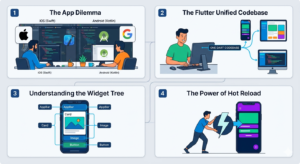
If you’ve ever tried to build an app, you know the massive headache: You usually have to build it twice. Once for the Apple App Store (using languages like Swift) and once for the Google Play Store (using languages like Kotlin). It takes double the time, double the money, and double the maintenance.
Enter Flutter.
Think of Flutter as a specialized, high-performance universal toolkit that Google created. Its main purpose in life is to solve that “build it twice” problem. It lets you write your app once and run it beautifully on iPhones, Android phones, and often the web and desktop too.
The Classic App Dilemma
[A graphic showing two developers working at separate desks, one labeled ‘iOS (Swift)’ and the other ‘Android (Kotlin)’, illustrating the traditional dual-codebase workload.]
Before tools like Flutter became mainstream, this was the reality. Companies needed two separate teams, or at least two separate projects, to reach both mobile audiences. The apps looked different, felt slightly different, and updating them was a nightmare because you had to sync two different workflows. It’s like having to rewrite a book from scratch in a different language just so a new audience can read it.
The Flutter Solution: One Codebase to Rule Them All
[A dynamic illustration of Flutter. In the center, a single developer uses a unified keyboard. A single line of code labeled ‘DART CODE’ flows outward, branching seamlessly into three vibrant app interfaces on a smartphone, a tablet, and a web browser, showing one project reaching multiple platforms simultaneously.]
Flutter changes the game by using a single programming language called Dart (also from Google). When you use Flutter, you write your code one time in Dart. When you hit “build,” Flutter magically compiles that single codebase into the raw, “native” code that iOS, Android, or the web understands.
You write the logic once, you design the look once, and it deploys everywhere.
The “Secret Sauce”: Everything is a Widget
[A detailed diagram illustrating the Flutter ‘widget tree.’ It shows a mobile screen disassembled into nested layers: the main ‘MaterialApp’ at the top, leading down to ‘Scaffold,’ then branching into ‘AppBar’ (with nested ‘Text’ and ‘Icon’) and ‘Body’ (containing nested ‘Column,’ ‘Image,’ and ‘Button’ widgets).]
This is the most “human” way to think about how Flutter actually works. Unlike other frameworks that try to tell the operating system to draw a button, Flutter says, “No, I will draw the button.”
Flutter visualizes your app as a construction kit. Every single visual element—the title bar, the button, the loading spinner, the text, and even the “padding” (the invisible space around a button)—is called a Widget.
You don’t just “build” a Flutter app; you assemble a tree of widgets, stacking them inside each other to get exactly the look you want. This gives developers incredible pixel-perfect control over every single dot on the screen. It also means apps build with Flutter are extremely fast and look identical on every device.
So, is Flutter worth it?
If you are a developer or a business looking to build an app today, Flutter is probably on your radar. It saves an immense amount of time, it’s remarkably fast, and the tools (like “Hot Reload”) let you see changes you make to the code instantly, without waiting minutes for the app to restart.
It’s not perfect for every possible use case (like hyper-complex, graphic-heavy 3D gaming), but for 95% of standard apps, Flutter has become the go-to toolkit.